Click a link below to view or download the Decision Tables for a craft:

Document Requires Adobe Reader Version 5 or higher to viewDEC-EN.pdf Decisions for Engineers
Document Requires Adobe Reader Version 5 or higher to view
DEC-CO.pdf Decisions for Conductors
Document Requires Adobe Reader Version 5 or higher to view
DEC-FO.pdf Decisions for Foreman
Document Requires Adobe Reader Version 5 or higher to view
DEC-BK.pdf Decisions for Brakemen & Switchmen

*The above decision table files require that you have Adobe Reader Version 5.0 or higher installed on your computer.  If you do not have Adobe Reader version 5.0 or higher, please click the “Get Adobe Reader” icon above right to download & install the program so you can view the decision tables.

Click a link below to jump to a specific section of this page:

The Decision Tables: Questions and Answers
The Decision Tables: Opening them in Adobe Reader
The Decision Tables: Disecting them / how to read them
The Decision Tables: In plain English

The Decision Tables: “Questions and Answers”

Q: What are decisions?

A: Decisions, Decision Tables, Decision Program, it’s all the same thing. ”Decisions” are how the computers in the call office are programmed to fill vacancies. When someone is needed to work a job, the caller runs        “Decisions” & it tells them who to call to work & in what order.

Q: Doesn’t the call office call in senority order?

A: Not anymore! (However, after the caller calls through various pools, and other conditions, some assignments are called in “straight” (top to bottom) senority order as a final result to find someone to fill a vacancy.).

Q: Isn’t the order the same for everyone or every job?

A: NO!  And that is why it is important to understand the decision tables (or at least know how to read them.)  Each pool EC, LL, CG, has its own procedure or calling order.  You may be one of the first to be called in one pool, but nearly the last person they will call in another pool.

Q: Who came up with this and who agreed to it?

A: Supposedly J. “Tick” Watkins in the call office (former chief caller for the Piedmont Division.) Former local   chairmen from both unions agreed to this at the request of the general chairmen from both unions.

Q: Why are Decisions so complicated, it doesn’t seem to have any “rhyme or reason?”

A. That’s a good question, for which we don’t have an answer.

Q: I don’t think I was called correctly (I think I was run around) what do I do now?

A: The first step is to look at the file on this site that has the decision table for your craft: EN, CO, FO, BK/SW. 
Next, open the file using Adobe Reader (formerly known as Adobe Acrobat Reader.)
On the left side are the pool codes, click on the one you want to see, (remember they are different for each         pool.)  Read the table. It may be handy to have the
“green book” (Crew Management & Payroll Reference Guide) handy if you’re not familiar with all of the pool or extraboard codes.

Q: Why do some pages of the decision tables have “jibberish,” funny characters or mis-spellings?

A: The pages were digitized using a scanner, then a program deciphered each word & spit it out in to the Adobe Reader or pdf type file. The program sometimes makes mistakes when the letters aren’t perfectly ledgible. Besides, I wasn’t going to re-type the whole thing.

Q: Why was a PDF file used, wouldn’t it have been better to make a webpage or make a text file?

A  A webpage for each piece of paper wasn’t pratical. Text files are easily edited & we could concievably end up with unofficial alterations to the decision tables; it’s important to preserve the text as it is. The Adobe PDF file allows for easy printing that fits on a page correctly, has a relatively small file size, & the text is preserved as it is intended to be.

Q: I have a question about Decisions that isn’t listed here, what can I do?

A:
Click here to email the webmaster of this site & we’ll get your questions answered.  You can always contact your appropriate union’s local & vice chair-persons with immediate issues concerning calls to work.

back to top of page

The Decision Tables: “Opening them in Adobe Reader”

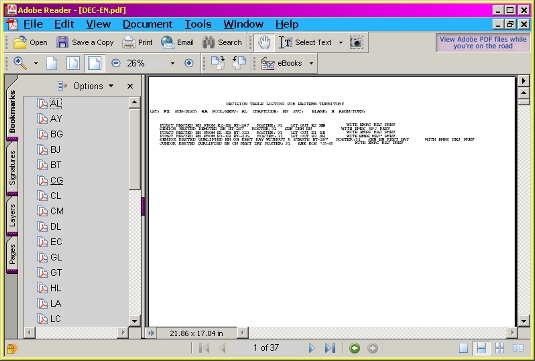
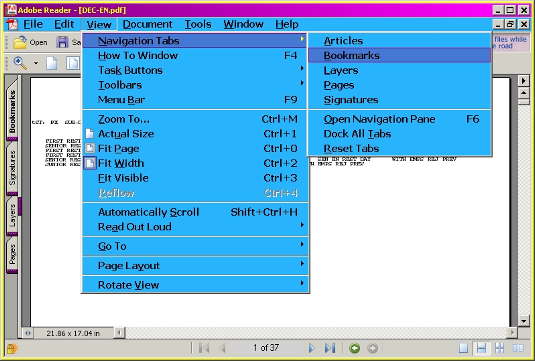
With the decision file open in Adobe Reader, be sure that you have a tab called “Bookmarks” on the left side of your screen. (If no bookmark tab is present, Click | File | View | Navigation Tabs | Boomarks in Version 6. Click | Window | Bookmarks in Version 5.) See image below.

Look down the Bookmarks Window on the left side of your screen & then click on the pool code you wish to view. (The program will jump directly to that page & display the decision table for that pool..) See image below.

back to top of page

The Decision Tables: “Disecting them / how to read them”

Below, the red text is from the decision table for the CG pool.
The
purple text is the explination “in English”
I have no idea what
”WITH EMPS REJ PREV” means.
Roster: 3I is simply referring to the Danville District engineer’s roster.

DECISION TABLE LISTING FOR EASTERN TERRITORY

DIST; PI SUB-DISTs EA POOL/SERV: BG CRAFT CODE; EN SVC: BLANK: N ASGN/TURN:
(PI is the district, EA is the subdistrict, BG is the pool, EN is the craft...)
(we need an engineer for the Burlington Local, P07 in this example.)

1 FIRST RESTED EN FROM E2-XB FN HT-287 ROSTER:3I 1ST OUT E2 XB WITH EMPS REJ PREV
(call engineers from the E2 extraboard, HT means home terminal 287, or pomona.)
(call engineers off the pomona extraboard.)

2 SENIOR RESTED DEMOTED EN ON TURN FN ROSTER:3I SEN DEM EN ON .JOB WITH EMPS REJ PREV
(call demoted (cut off) engineer on the job, P07, a conductor or brakeman, if there is one.)

3 SENIOR RESTED DEMOTED EN FN HT-287 ROSTER:3I SEN DEM EN GREENSBOR WITH EMPS REJ PREV
(call demoted (cut off) engineers from pomona next.)

4 SENIOR RESTED EN FN HT—287 ROSTER:3I SEN EN AT GREENSBORO WITH EMPS RECT PREV
(call oldest to youngest engineers from pomona.)

5 SENIOR RESTED QUALIFIED EN TO-PLACE FN HT-287 ROSTER:3I TO PLACE/WAIT RUN WITH EMPS REJ PREV
(call oldest to youngest engineers, who’s home terminal is pomona, that may be down to place.)

5-01 SENIOR RESTED QUALIFIED EN WAITING TURN FN HT-287 ROSTER:3I TO PLACE/WAIT RUN WITH EMPS REJ" PREV
(call oldest to youngest engineers, who’s home terminal is pomona that have stepped up & are now waiting on their turn to come back to pomona.)

6 SENIOR RESTED QUALIFIED EN LAY-OFF FN HT-287 ROSTER:3I MARKED OFF/MISS CALL WITH EMPS REO PREV
(call oldest to youngest engineers, who’s home terminal is pomona, that are marked off.)

6-01 SENIOR RESTED QUALIFIED EN MISSED-CALL FN HT-287 ROSTER:3I MARKED OFF/MISS CALL WITH EMPS RE*J PREV
(call oldest to youngest engineers, who’s home terminal is pomona, that have missed a call.)

FIRST RESTED EN FROM El-XB FN ROSTER:3I 1ST OUT El XB WITH EMPS RECT PREV
(call rested engineers from the E1-XB or linwood extraboard.)

FIRST RESTED EN FROM E3-XB FN ROSTER:3I 1ST OUT E3 XB WITH EMPS REJ PREV
(call rested engineers from the E3-XB or Danville extraboard.)

FIRST RESTED EN FN ROSTER:3I STRAIGHT SENIORITY
(call oldest to youngest engineers from the *E1* roster or danville district engineer’s roster.)

Below, the red text is from the decision table for a yard foreman on assignment PL01.
*When reviewing yard assignments, be sure to read the
assignment /turn number, since it may be different for each assignment, such as the case for calling a PL84, 86, 87, instead of a PL90 -PL96.
The
purple text is the explination “in plain English”
I have no idea what
”WITH EMPS REJ PREV” means.
Roster: 3L is simply referring to the Danville District Yard Foremen & Switchmen’s roster.

DECISION TABLE LISTING FOR LINWOOD TERRITORY

DIST; PI SUB-DISTs LI POOL/SERV: YD CRAFTCODEs FO SVC: BLANK: N ASGN/TURN: YPLS01
(PI is the district, LI is the subdistrict, Foreman is the craft, PL01 is the assignment...)
(We need a “hump conductor...”)

1  SENIOR RESTED QUALIFIED FO NOT ON REST DAY ON JOB ROSTER :3L HUMP STEPUP SW TO FO
(call the senior hump quailified switchman, not on his off day, & step him up to foreman.)

2  SENIOR RESTED QUALIFIED FO NOT ON REST DAY SHIFT - HT-323 ROSTER ;3L HUMP SEN HUMP FO - SHIFT
(call /use the senior hump qualified foreman on the shift, who is not on a rest day.)

3  FIRST RESTED QUALIFIED FO FROM Sl-XB WITHOUT 5 STARTS ROSTER :3L HUMP 1ST OUT Sl XB
(call the 1st rested, senior hump quailified, switchman from the S1 extraboard who does not have 5 starts.)

FIRST RESTED QUALIFIED FO FROM Sl-XB WITH 5 STARTS ROSTER :3L HUMP FIVE DAY LIST
(call the 1st rested, senior hump quailified, switchman from the S1 extraboard who does have 5 starts.)

5  SENIOR RESTED QUALIFIED FO ON REST DAY SAME YARD ROSTER :3L RQWK HUMP SEN FO XT WK HUMP
(call the senior hump quailified foreman who is on his off day and who’s name appears on the extra work list.)

6  SENIOR RESTED QUALIFIED FO ON REST DAY SAME YARD ROSTER :3L HUMP %NWK SEN FO R/D HUMP
(call the senior hump quailified foreman who is on his off day and who’s name does not appear on the extra work list.)

7  SENIOR RESTED QUALIFIED FO TO-PLACE ROSTER :3L HUMP %NWK TO PLACE
(call the senior hump quailified foreman, who is down to place.)

8  SENIOR RESTED QUALIFIED FO LAY-OFF ROSTER; 3 L HUMP %NWK MARKED OFF/MISS CALL
(call the senior hump quailified foreman, who has missed a call, and who’s name appears on the extra work list.)

9  SENIOR RESTED QUALIFIED FO MISSED-CALL ROSTER; 3L HUMP %NWK MARKED OFF/MISS CALL
(call the senior hump quailified foreman, who has missed a call, and who’s name does not appear on the extra work list.)

10 SENIOR RESTED QUALIFIED FO ROSTER:3L HUMP %NWK STRAIGHT SENIORITY
(call, from top to bottom, down the list of hump quailified foreman.)

back to top of page

The Decision Tables: “In plain English”

Below, the red text is from the decision table for the CG pool.
The
purple text is the explination “in plain English”
I have no idea what
”WITH EMPS REJ PREV” means.
Roster: 3I is simply referring to the Danville District engineer’s roster.

DECISION TABLE LISTING FOR EASTERN TERRITORY

DIST: PI SUB-DIST; EA POOL/SERV: CG CRAFTCODE: EN SVC; BLANK: N ASGN/TURN:
(PI is the district, EA is the subdistrict, CG is the pool, EN is the craft.)

I FIRST RESTED EN FROM El-XB ROSTER; 31 1ST OUT El XB WITH EMPS REJ PREV
(use the first rested engineer from the linwood extraboard if one is available.)

2 SENIOR RESTED DEMOTED EN HT-323 ROSTER: 31 SEN DEM EN WITH EMPS RECT PREV
(call all the “cut off” engineers at linwood, oldest to youngest.)

3 SENIOR RESTED QUALIFIED EN TO-PLACE HT-323 ROSTER: 31 TO PLACE/WAIT RUN WITH EMPS REJ" PREV
(call all engineers at linwood who are down to place, oldest to youngest.)

3 01 SENIOR RESTED QUALIFIED EN WAITING TURN HT-323 ROSTER: 31 TO PLACE/WAIT RUN WITH EMPS RECT PREV
(call all engineers at linwood that have stepped up, missed their turn (while working) & are waiting on their job to get back in town, oldest to youngest.)

4 SENIOR RESTED QUALIFIED EN LAY-OFF WAITING TURN HT—323 ROSTER: 31 MARKED OFF/MISS CALL WITH EMPS REJ PREV
(call all engineers at linwood who have been marked off sick & are now marked up, at home, & waiting on their job to get back in town, oldest to youngest).

4 01 SENIOR RESTED QUALIFIED EN MISSED-CALL WAITING TURN HT—323 ROSTER: 31 MARKED OFF/MISS CALL WITH EMPS REJ" PREV
(call all engineers at linwood who have missed a call and are sitting at home, oldest to youngest.)

5 SENIOR RESTED QUALIFIED EN HT323 ROSTER:31 STRAIGHT SENIORITY WITH EMPS REJ- PREV
(call down the engineer’s senority roster (e1 roster) from top to bottom.)

back to top of page

[Home] [Agreements] [BLET Member Log In] [Contact Us] [Decision Tables] [Discussion Forum] [Dues & Payroll] [Forms Guides & Charts] [History] [Insurance and Health] [Introduction] [Meeting Information] [News] [NS Resources] [RR Retirement] [Site Map] [What's New]